
I architect systems for a living. I spend my days designing secure, scalable ecosystems for Fortune 500 companies, ensuring data flows correctly between Salesforce, Mulesoft, and AI agents.
Yet, for the longest time, my own digital home was built on “rented land.”
I was writing on platforms like Hashnode and Medium. They are fantastic tools, but they are Black Boxes. I found myself wrestling with random timeouts, Cloudflare verification loops, limited free articles that blocked my readers, and rigid styling that felt like wearing a uniform.
As an architect, this friction was a signal. It was time to stop renting and start building.
I wanted a solution that was:
- Secure: My drafts and source code must be private.
- Resilient: Static HTML. No databases to hack. No servers to crash.
- Automated: Write once, publish everywhere (Website + Newsletter).
- Free: High-performance hosting shouldn’t cost a monthly subscription in 2025.
Here is the blueprint of how I built my new “Digital Garden” using Hugo, GitHub Pages, and MailerLite—completely for free.
The Architecture: Private Source, Public Face
The standard way to use GitHub Pages is simple: make a public repo, push code, and it goes live.
The problem? I didn’t want my rough drafts, my experimental Python scripts, or my configuration secrets exposed to the world.
The Solution: A decoupled “Hub and Spoke” CI/CD pipeline.
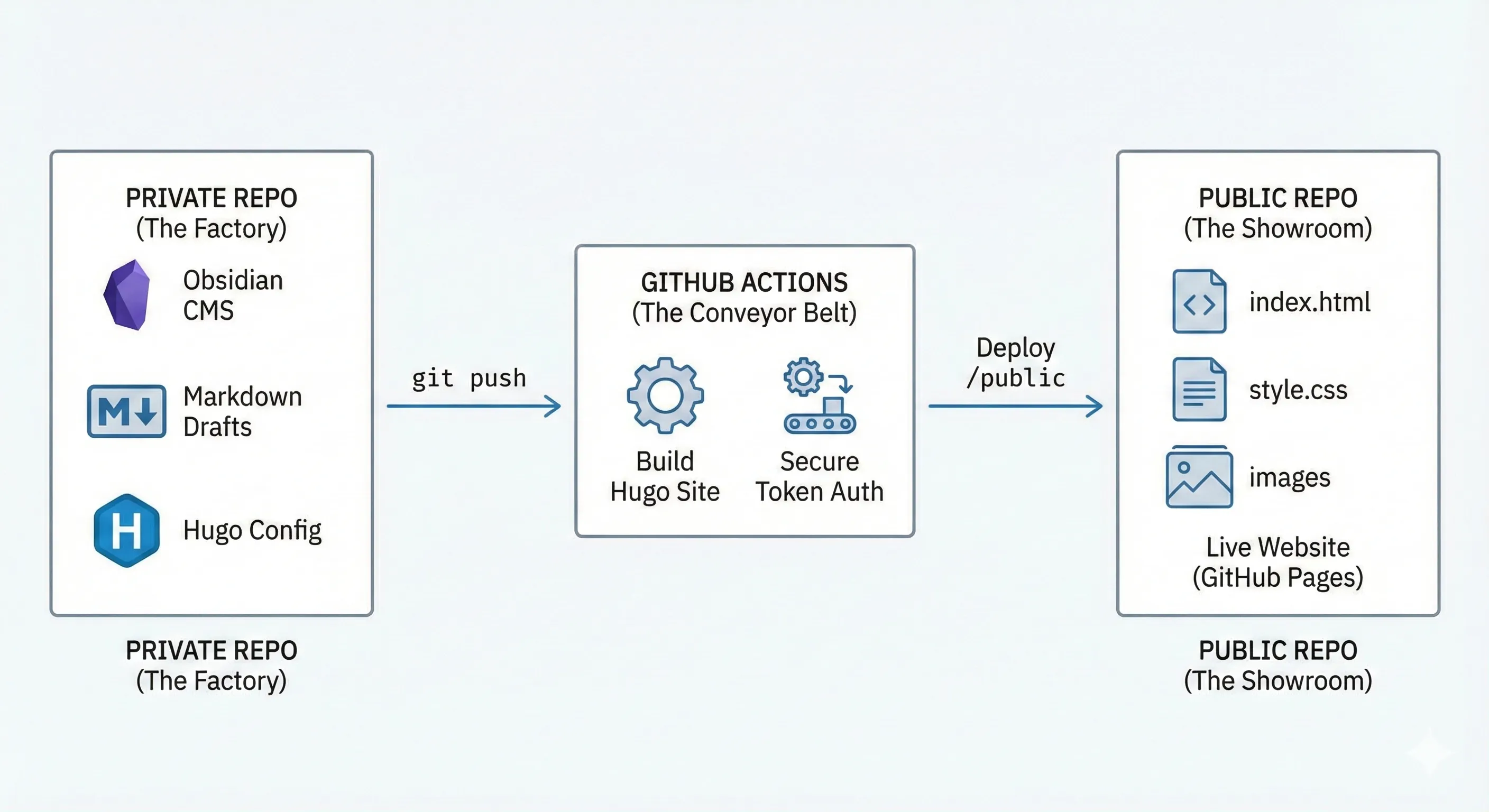
- Repo A (Private): The “Factory.” This contains my markdown files, my Obsidian drafts, and my Hugo configuration.
- GitHub Actions: The “Conveyor Belt.” It listens for changes, builds the site, and filters out the secrets.
- Repo B (Public): The “Showroom.” This repo contains only the compiled static HTML that the world sees.
The Stack
- Engine: Hugo (Blazing fast SSG).
- Theme: PaperMod (Minimalist, high-performance).
- CMS: Obsidian (Local, distraction-free writing).
- Newsletter: MailerLite (RSS Automation).
- Typography: Space Grotesk + JetBrains Mono.
Step 1: The Security Layer (GitHub Actions)
The magic happens in the .github/workflows/deploy.yml file inside my private repo.
Whenever I push from Obsidian, this script spins up an Ubuntu runner, installs Hugo, builds the site, and deploys only the public folder to my external repo.
Here is the config that powers this site:
yaml

name: Deploy to GitHub Pages

on:
	push:
		branches:
		- main
jobs:
	deploy:
		runs-on: ubuntu-latest
		steps:
		 - name: Checkout Private Source
		   uses: actions/checkout@v4
		   with: submodules: true # Fetch themes
		   fetch-depth: 0

		 - name: Setup Hugo
		   uses: peaceiris/actions-hugo@v3
		   with:
			   hugo-version: 'latest'
			   extended: true

		 - name: Build
		   run: hugo --minify

		 - name: Deploy to Public Repo
		   uses: peaceiris/actions-gh-pages@v3
		   with:
			   personal_token: ${{ secrets.API_TOKEN_GITHUB }}
			   external_repository: <git username>/<git username>.github.io
			   publish_dir: ./public publish_branch: main
The Architect’s Note: By using secrets.API_TOKEN_GITHUB, I grant the action permission to write to the public repo without ever hardcoding credentials.
Step 2: The Migration (Python vs. The World)
Moving 50+ articles isn’t something I do manually. I needed to sanitize the metadata, fix date formats, and organize images into “Page Bundles” (folders) so they work seamlessly with Hugo.
I wrote a custom Python script to parse my exports. It acts as a middleware, transforming “Platform-Specific JSON” into “Universal Markdown.”
The key transformation logic:
- Slugify Titles: Ensure URLs are clean and SEO-friendly.
- Standardize Dates: Convert
Sun Jun 15...to ISO2025-06-15. - Page Bundles: Create a folder for every post
content/posts/my-post/index.mdso images live with the content, not in a messy global bucket.
Step 3: The Automation (Newsletter)
The final piece of the puzzle was distribution. I didn’t want to log into a separate platform to send emails.
I connected MailerLite to my Hugo index.xml RSS feed.
The Workflow:
- I write an article in Obsidian.
- I run
git push. - That’s it.
MailerLite watches my feed. When it detects a new item, it automatically formats it into a beautiful email and sends it to my subscribers on Tuesday mornings. It’s a “Serverless Newsletter.”
Conclusion: Own Your Stack
This setup required a weekend of engineering, but the payoff is absolute freedom.
I am no longer dependent on a platform’s uptime or algorithm. I own the pipe, I own the data, and I own the relationship with my audience.
This is my digital garden. It’s built on open standards, backed by git, and designed to scale.
Curious about the code or the patterns I used? Check out the repo or subscribe below to follow the journey.