How a custom Outlook Add-in, Azure Functions, and AI can eliminate manual data entry and create perfect CRM notes or tasks every time.
Every professional who uses a CRM has felt this pain. You finish an important email exchange with a client — full of critical details, action items, and subtle sentiment cues — and then comes the administrative tax: logging it all in Salesforce.
You copy and paste, you try to summarize the key points, you search for the right Account or Opportunity, and you create a Task. It’s a tedious, time-consuming process that’s universally disliked yet essential for maintaining a clear customer record.
I decided to build a better way. What if you could capture the essence of an email, link it to the right Salesforce record, and create a perfectly formatted note with a single click?
This is the story of how I built a custom “Copilot” to do just that.
The Problem: The “CRM Tax” is Costing Us More Than Just Time
The friction of manual data entry isn’t just an annoyance; it has real business consequences:
Lost Information: Key details are often missed when summarizing long email threads.
Inconsistent Data: Everyone logs notes differently, making reports unreliable.
Wasted Time: Our sales and service teams were spending hours on administrative work instead of engaging with customers.
What About Native Solutions? The Limits of Einstein Activity Capture
“But wait,” you might ask, “doesn’t Salesforce already have a tool for this with Einstein Activity Capture?”
It’s a fair question. EAC is great at what it does: automatically syncing your emails and events to the Salesforce timeline. It solves the problem of getting the data in. The problem is, it just creates a digital copy of the email. For any busy sales rep looking back at a six-month-old opportunity, the activity timeline is a wall of text — a dozen logged emails they have to re-read to find the one crucial detail they need.
EAC provides a record, but it doesn’t provide meaning.
We didn’t just want to store emails; we wanted to distill them into intelligence. The value isn’t in having the email record, it’s in having a scannable, action-oriented summary that tells you what matters in seconds. That’s the gap our solution is designed to fill.
THE Solution: A Smart Outlook Add-in
The solution is a simple but powerful Office Add-in that lives directly within Outlook. It automates the entire workflow in a few seconds.
Here’s what it does:
It reads the email context, including the subject, body, and all attendees.
It automatically finds the right Salesforce Account by matching attendee emails with Salesforce Contacts.
With one click, it sends the email content to an AI to generate a structured summary.
Finally, it saves that summary as a Task linked to the correct Salesforce Account.
What used to be a five-minute, multi-step process now takes less than 10 seconds.
The User Experience in Action
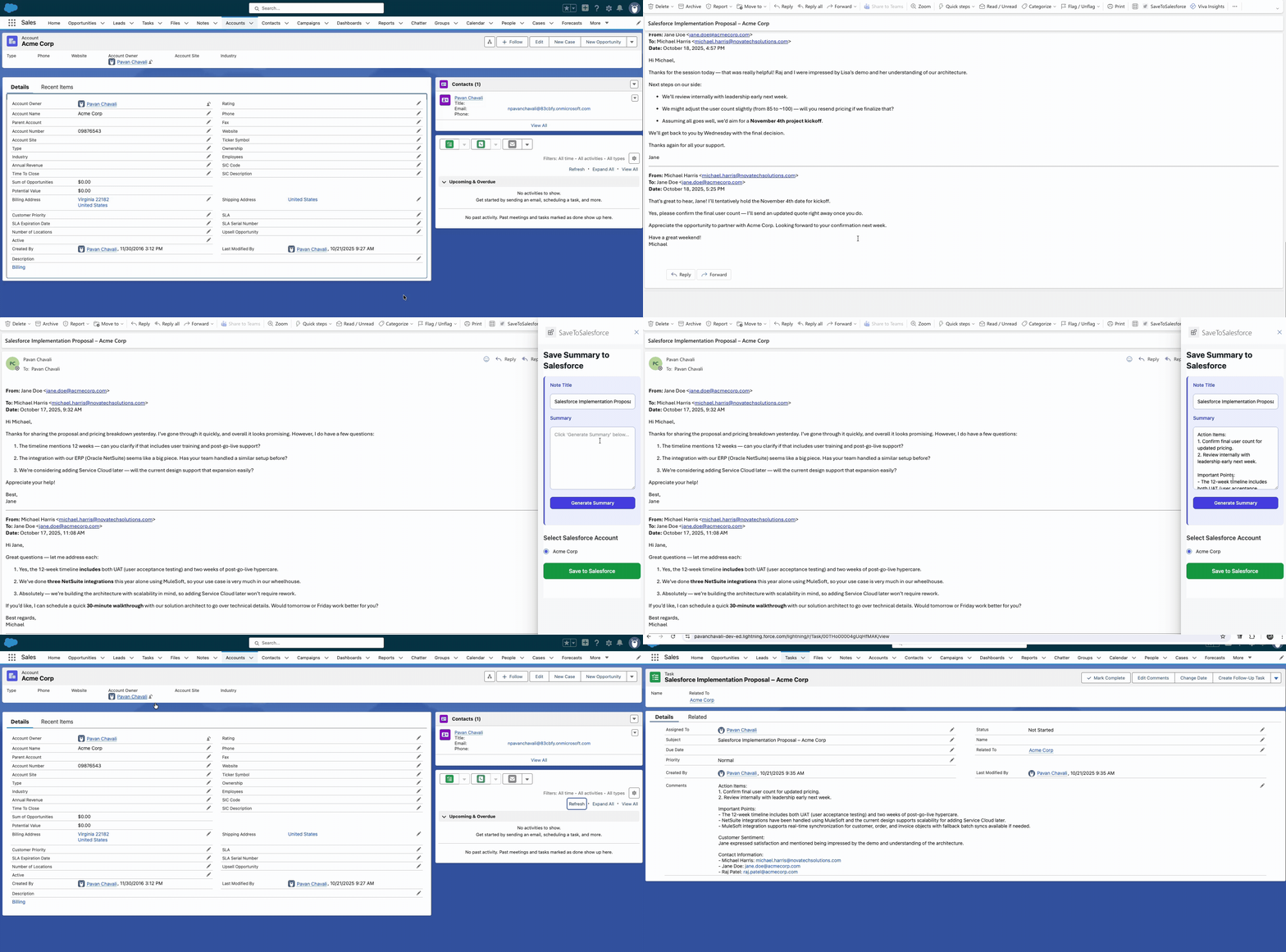
Watch the workflow unfold in this screen recording. When an email is opened, the “Save to Salesforce” add-in activates in the task pane.
It immediately gets to work, analyzing the attendees’ emails. You’ll notice it automatically queries Salesforce in the background and presents the matching accounts, pre-selecting the most probable one.
Next, the user clicks “Generate Summary”. This sends the email content securely to our AI backend. In just a moment, the structured summary — formatted exactly as we defined with Action Items, Important Points, and more — appears directly in the add-in, ready for review.
After a quick review (or edits, if needed), the user clicks “Save to Salesforce”. The system confirms the task has been successfully created and linked to the chosen account in Salesforce.
As you can see, the entire interaction is logged accurately and intelligently in Salesforce in a matter of seconds, transforming a tedious manual task into a seamless, efficient action.
The Architecture: How It All Works
Frontend (Office Add-in): A simple web application (HTML, CSS, JavaScript) built using the standard
yo officegenerator. It runs inside Outlook and is responsible for the user interface.Backend (Azure Functions): A serverless Python application that acts as the brain. It has three key jobs:
- Find Accounts: Takes attendee emails and queries Salesforce to find matching records.
- Generate Summary: Securely calls the Azure AI (or Gemini) API with a custom prompt to summarize the email text.
- Save to Salesforce: Authenticates to Salesforce using a secure JWT flow and creates the final Task record.Salesforce (Connected App): A secure entry point that allows our backend to communicate with the Salesforce API without ever storing user passwords.
Azure AI / Google AI: The AI engine that provides the summarization capabilities. Our detailed prompt engineering ensures the output is always structured and consistent.
Using a serverless function as the middleware is the key to making this scalable and cost-effective. We only pay for the few seconds the code is running, and the same backend can be used to support future add-ins for other platforms like Gmail or Teams.
Lessons Learned & What’s Next
Building this tool was a journey through modern web development, from frontend UI and browser security (CORS is never fun!) to backend authentication and AI integration. The biggest takeaway is that with the right architecture, you can create incredibly powerful automations that solve real-world business problems.
The future possibilities are even more exciting:
Proactive Suggestions: The AI could analyze the summary and suggest the next best action or draft a follow-up email.
Multi-Platform Support: The backend is ready to support a Gmail Add-on or a Microsoft Teams extension with minimal changes.
Deeper Salesforce Integration: We could expand it to create other record types, like Opportunities or Cases, directly from an email.
By automating the “CRM tax,” we’re not just saving time; we’re empowering our teams to focus on what they do best: building relationships with customers.
Introducing Version 2: Smarter, More Flexible Integration
Building on the foundation of our initial Copilot, we listened to feedback and pushed the intelligence further. Version 2 introduces several key enhancements:
- Automatic Account Matching: The add-in now intelligently suggests the most likely Salesforce Account(s) by matching email attendees to your Contacts, reducing manual searching.
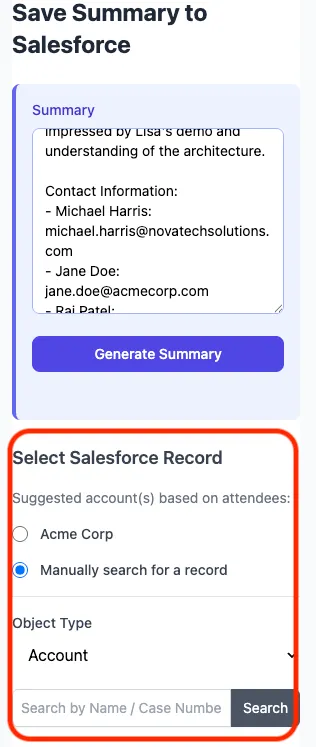
- Manual Record Search: If no match is found, or if you need to relate the summary elsewhere, you can now easily search for Accounts, Contacts, Opportunities, or Cases directly within the add-in.
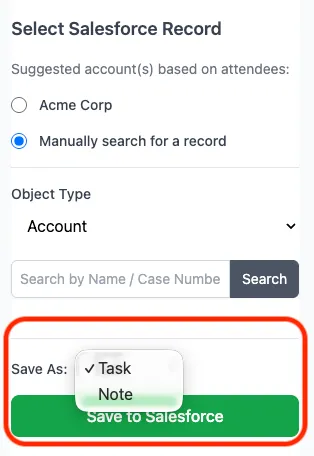
Save as Task or Note: You now have the flexibility to save the AI summary as either a Salesforce Task or a structured Note (
ContentNote), depending on your workflow.Smart Case Comment Creation: When linking to a Salesforce Case, the add-in automatically creates a Case Comment, keeping the conversation threaded correctly.
Refined UI: The interface is cleaner, hiding the summary until generated and integrating the record search more seamlessly.
These updates move the tool beyond simple summarization towards a more context-aware and adaptable assistant, making the process of logging email interactions even more efficient and accurate.