In the world of enterprise security, Supply Chain Attacks as considered as massive, complex nightmares—think SolarWinds or the XZ Utils backdoor. We assumed they were the domain of nation-states targeting enterprise build servers.
But “Vibe Coding” has democratized the Supply Chain attack.
Today, the default workflow for senior engineering is asking an LLM for a quick fix. The AI hallucinates a solution, and we copy-paste the import statement without a second thought. But LLMs are dream machines, not compilers. They don’t check the npm registry; they predict the next token.
When an AI suggests import { safe-fetch } from 'react-helper-v9', and that package doesn’t actually exist, you enter the kill zone.
If an attacker registers react-helper-v9 ten minutes before you type npm install, you aren’t just installing a typo. You are voluntarily executing a micro-Supply Chain attack on your own laptop. You are granting execution rights to a stranger because a chatbot told you to.
📉 The ‘Why’ (The Problem)
The current security stack acts like a detective, not a bodyguard. Tools like Snyk, Socket.dev, or GitHub Dependabot are excellent, but they suffer from a fatal flaw in the context of local development: Latency.
The Workflow: You run
npm install. The package downloads. Thepostinstallscript executes. Then your CI/CD or IDE scanner analyzes thepackage.json.The Breach: By the time the scanner alerts you to a malicious package, the
postinstallscript has already exfiltrated your.envfile to a remote server.
We are solving for the wrong variable. We don’t need to analyze the code after it lands on the disk. We need to intercept the intent before the network request is authorized.
🏗️ The Architecture (The Solution)
To close this gap, I built npm-guard.
It isn’t a SaaS. It isn’t a browser extension. It is a piece of systems plumbing designed to sit between your shell and the Node package manager.
The Stack:
Language: Rust (for sub-millisecond startup time and memory safety).
Mechanism: CLI Middleware / Shell Shim.
Runtime: Zero Node.js dependency (avoiding the very ecosystem we are policing).
The Plumbing: The installation script modifies your .zshrc or .bashrc to alias the npm command. When you type npm install [package], the shell doesn’t call Node. It calls the npm-guard binary.
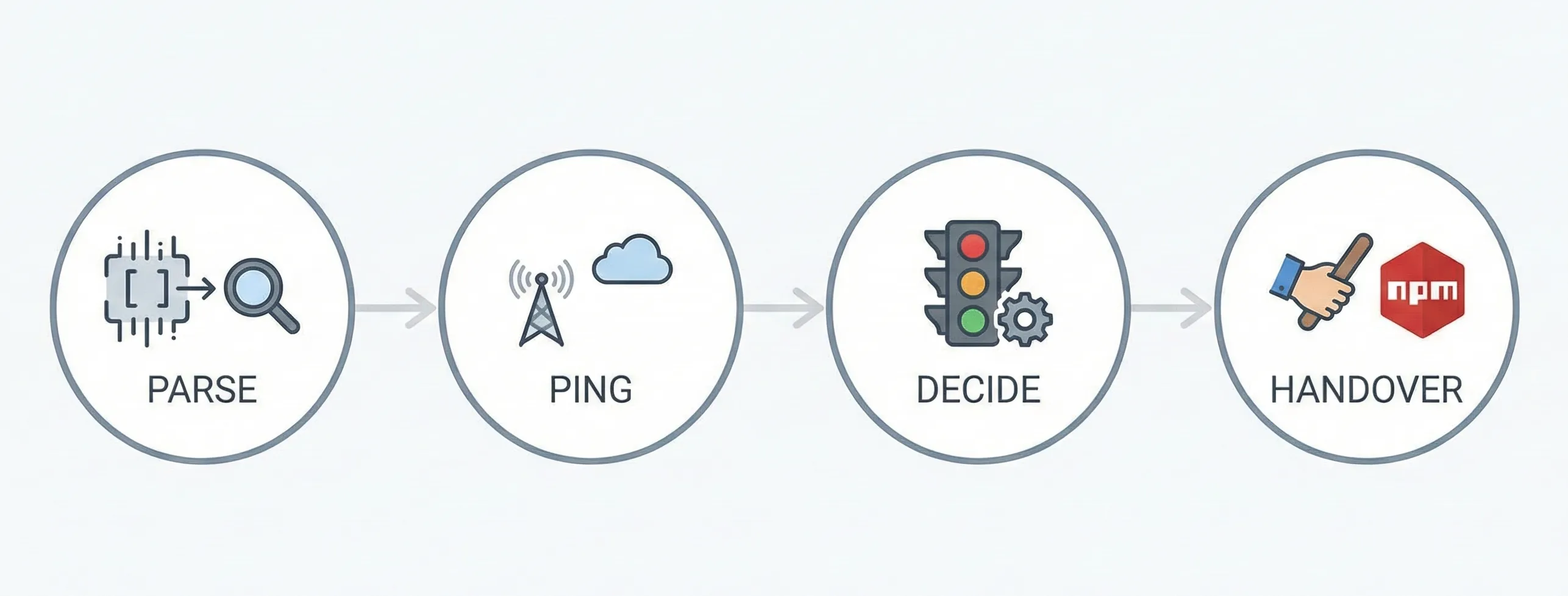
Parse: The binary strips the arguments to identify the target package.
Ping: It fires a lightweight, anonymous HEAD request to the public registry.
Decide: It applies the “Traffic Light” logic.
Handover: If safe, it spawns the actual
npmprocess and passes the original arguments through.
🚦 The Logic (The Traffic Light)
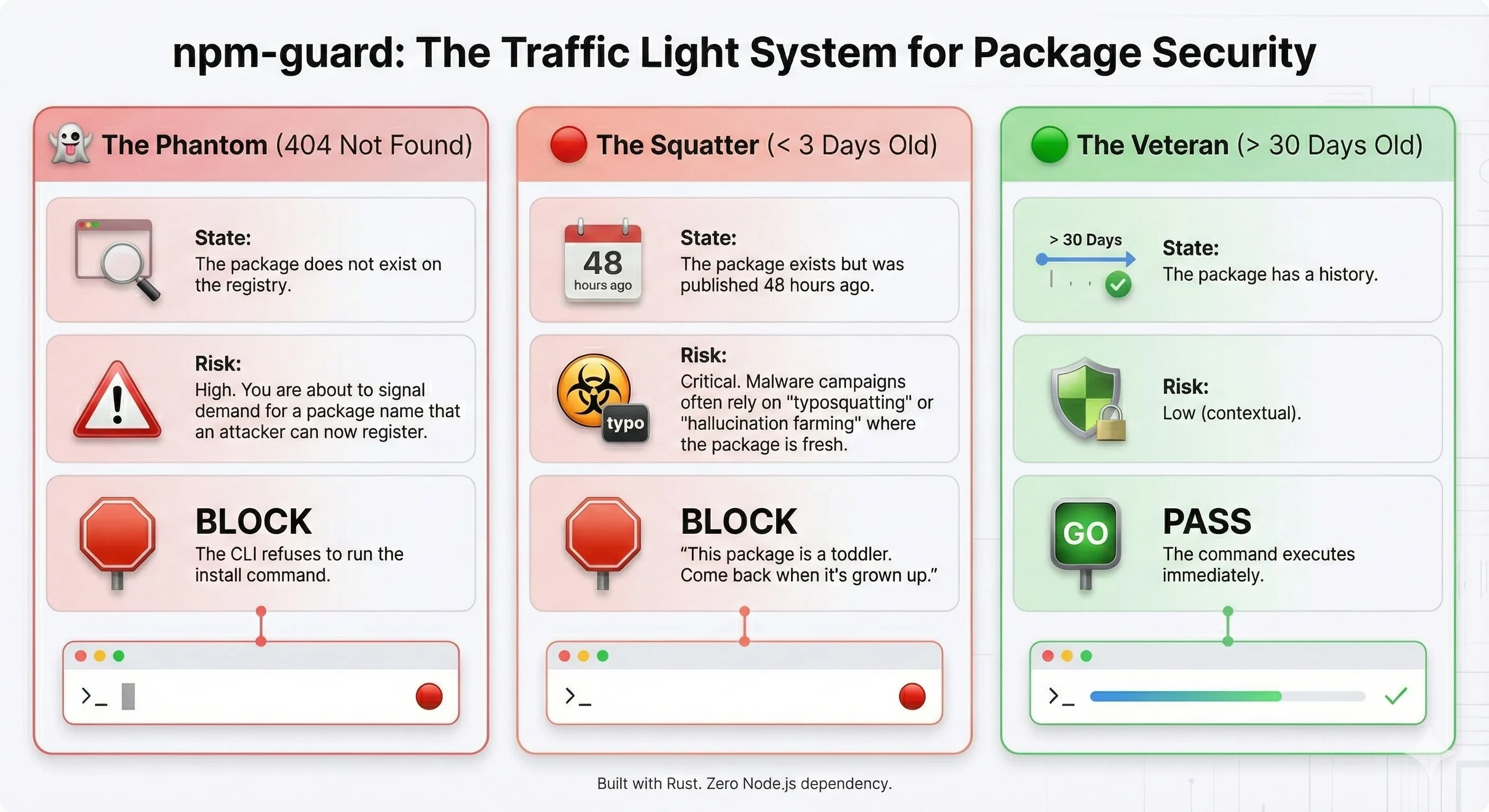
The core value proposition is the “Three-State Logic.” We aren’t looking for CVEs (that’s Snyk’s job later). We are looking for existence and maturity.
How Detection Actually Works (The Heuristics)
While the architecture handles the interception, the security logic relies on Temporal Analysis of the registry metadata. I currently enforced these three rules:
The Phantom Rule (Anti-Hallucination):
Check: Does the registry return
404 Not Found?Logic: If you try to install a package that doesn’t exist,
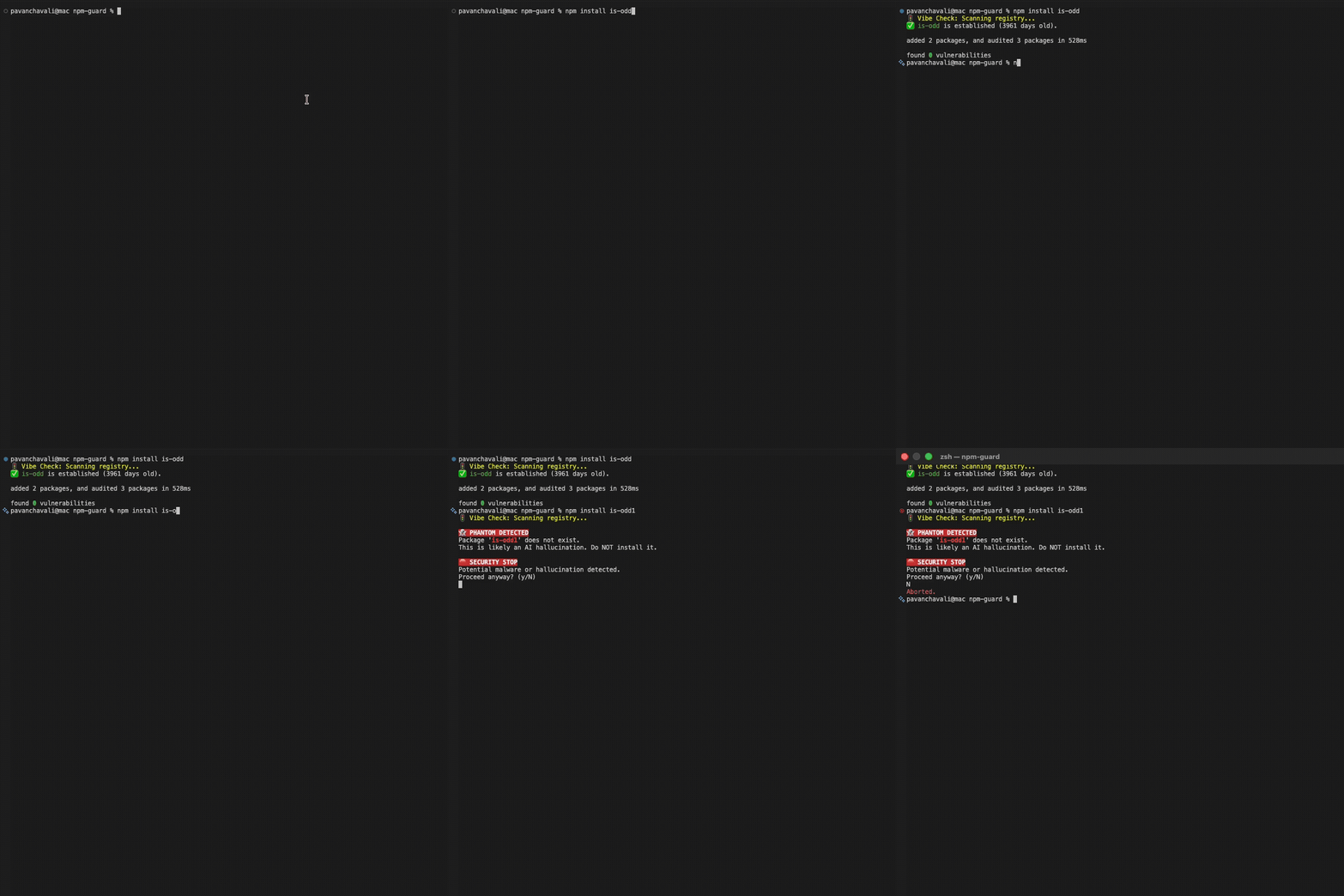
npm-guardblocks it. This prevents “Phantom Dependency” attacks where attackers monitor 404 logs to register names just after you try to access them.
The Toddler Rule (Anti-Squatting):
Check: Is
time.created< 3 days?Logic: Typosquatting packages are usually registered minutes or hours before an attack. By blocking anything younger than 72 hours, we neutralize the “Fresh Malware” vector without needing complex string analysis.
The Veteran Rule (Trust):
Check: Is
time.created> 30 days?Logic: If a package has survived on the registry for a month without being taken down by NPM security, it gains a “Green Light” for silent installation.
Application in Action:
⚠️ The Reality Check (The Constraints)
Let’s talk about the physics of intercepting shell commands.
Latency Tax: Every
npm installnow incurs a network round-trip overhead. In Rust, this is negligible (<50ms), but on a bad connection, you will feel it.The “Fail Open” Philosophy: If the npm registry is down, or the user is offline,
npm-guardcannot verify the package.- My decision: Fail Open. If we can’t check, we warn the user but let the install proceed. A developer tool that breaks the build when the Wi-Fi is spotty gets uninstalled immediately.
Privacy First: There is no backend. No data collection. The tool talks directly from your machine to
registry.npmjs.org. I don’t want your data; I want your environment to be secure.
🔮 The Future
We are moving toward a “Zero Trust” local environment. The days of treating the CLI as a trusted input method are over.
Right now, npm-guard V1 is live for macOS and Linux. The Shim architecture works beautifully in Bash/Zsh.
The Ask: I am a Unix guy. I need PowerShell/Windows experts to help port the shim logic. The Rust binary compiles fine on Windows, but the command interception needs a native touch.
Get involved: npm-guard
💬 Let’s Argue
Is the convenience of “Vibe Coding” worth the risk of granting execution permissions to unverified code? Or should we force a “cooling-off period” for every new package on the registry?
I learn as much from the debate as I do from the documentation.
🌱 Want more experiments? This is just one plant in my digital garden. I’m constantly breaking things, hitting limits, and documenting the fixes over at my personal site.
If you like deep dives into the “Real World” of Enterprise AI (minus the marketing fluff), go check it out:👉 Pavan’s Digital Garden