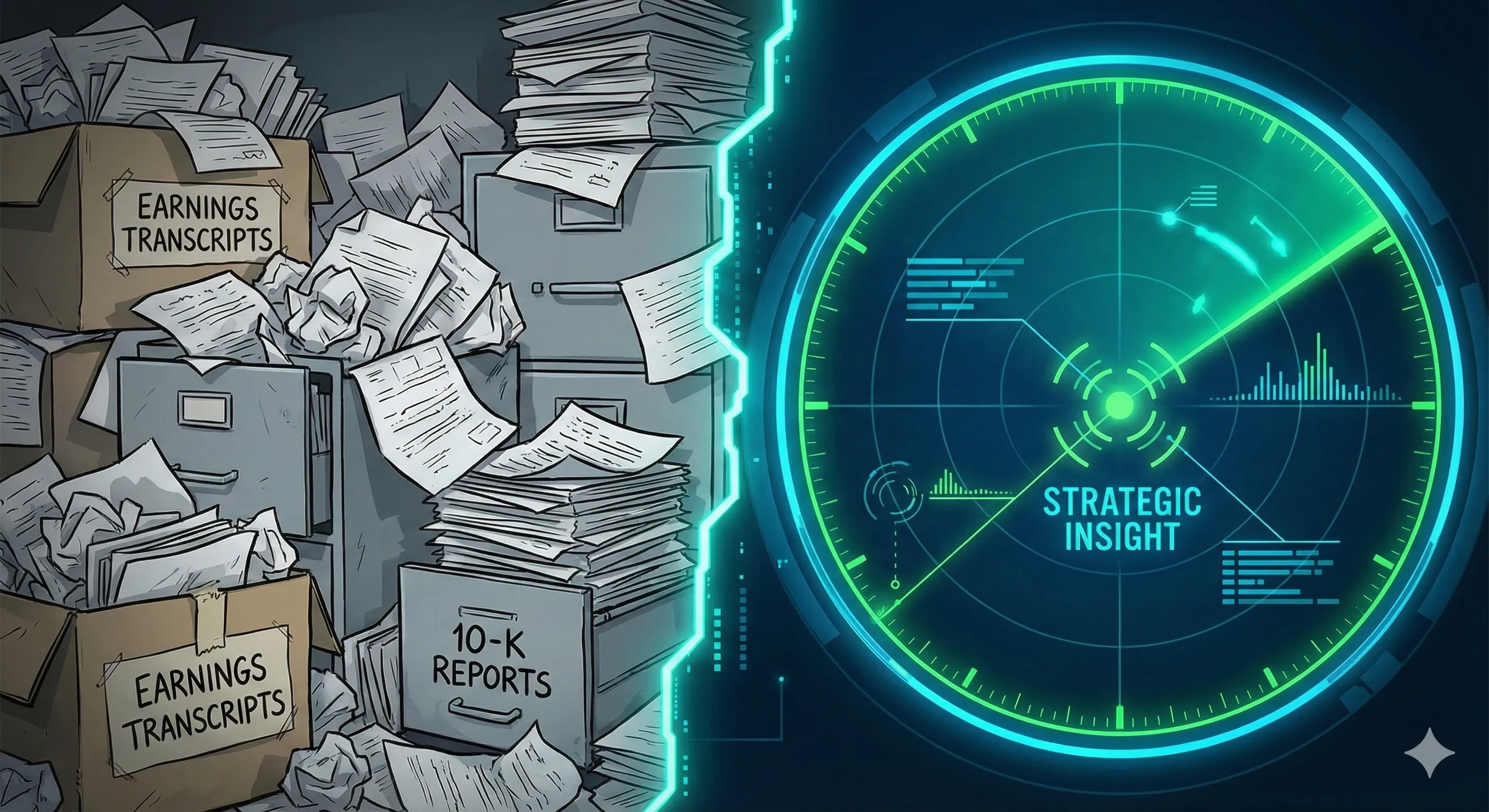
Everyone is building chatbots right now. It’s the “Hello World” of the AI era!
But here is the dirty secret of Enterprise AI: Latency and Tokens are the new technical debt.
If you simply paste a Python demo into a Salesforce Flow, you aren’t building an agent—you’re building a generic “chat” interface that burns cash and hits timeouts.
I learned this the hard way. I set out to build Revenue Radar, an agent that analyzes massive 40-page earnings calls.
Version 1 worked, but it was slow, expensive, and constantly fought Salesforce Governor Limits.
Version 2 handled the same workload 3x faster and 70% cheaper.
Here is how I moved from “Demoware” to a production-ready architecture by respecting the physics of the platform.
💡 The Idea
I recently set out to build Revenue Radar—an AI Agent that reads a company’s quarterly earnings call (which can be 40+ pages of text), extracts the CEO’s strategic focus, and drafts a hyper-personalized sales email for our Account Executives.
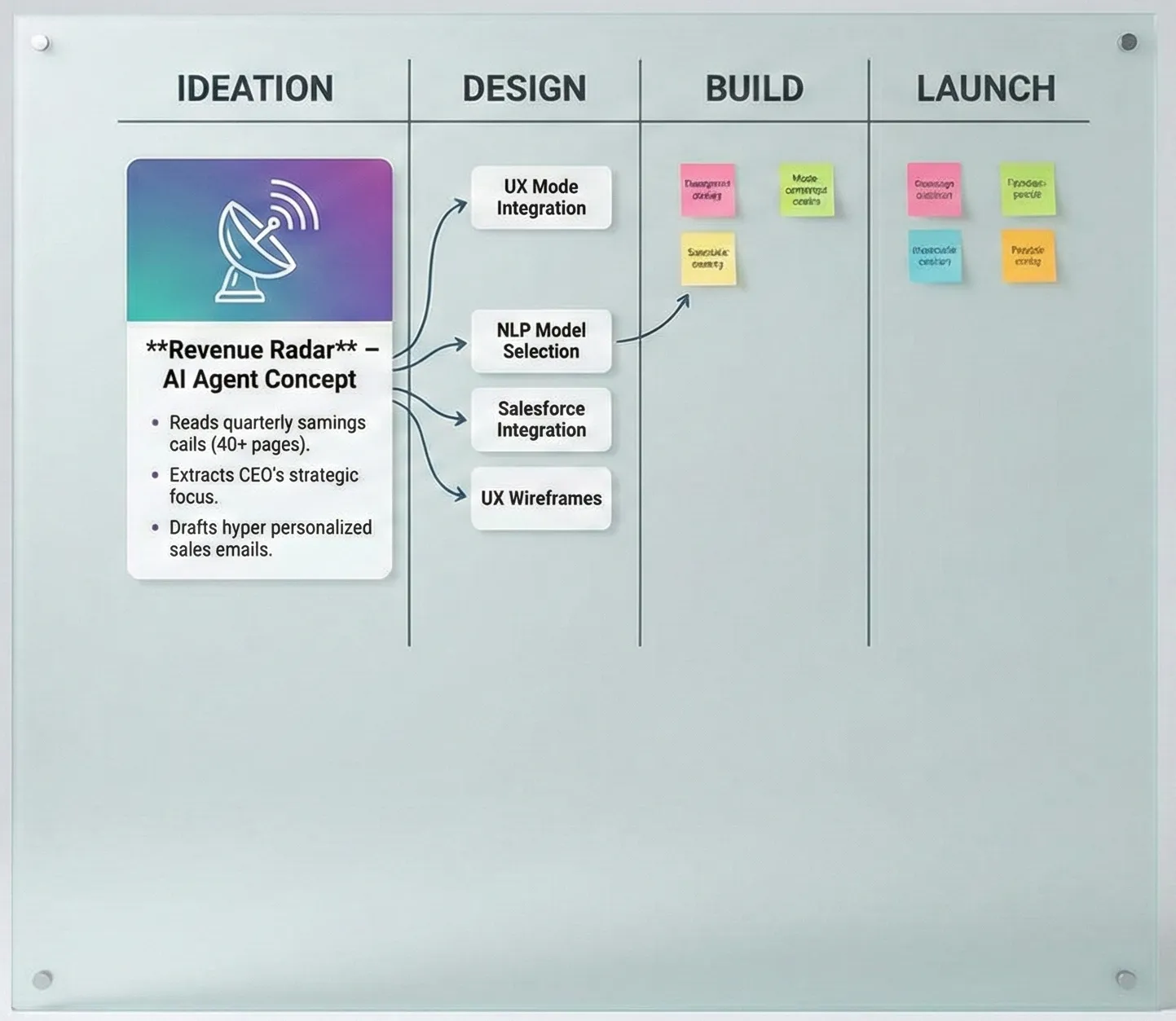
The goal? Stop wasting time reading PDFs and start selling value.
But this wasn’t easy. I hit walls with Flow, battled Named Credentials, and debugged HTML errors in my sleep. Here is the full architecture, the walls I hit, and how I actually got this thing “Prod Ready.”
🏗️ The Premise: Hype vs. Reality
We talk a lot about “AI Context,” but context has a physical weight. A standard 10-K report or Earnings Transcript is massive—easily 50,000+ tokens.
If you try to shove that into a standard Salesforce Prompt Builder or a synchronous Flow transaction, you hit limits fast. You hit Heap Size errors. You hit Timeout errors.
I needed an “Account Strategy Agent” that could ingest massive financial documents without blinking.
The Stack:
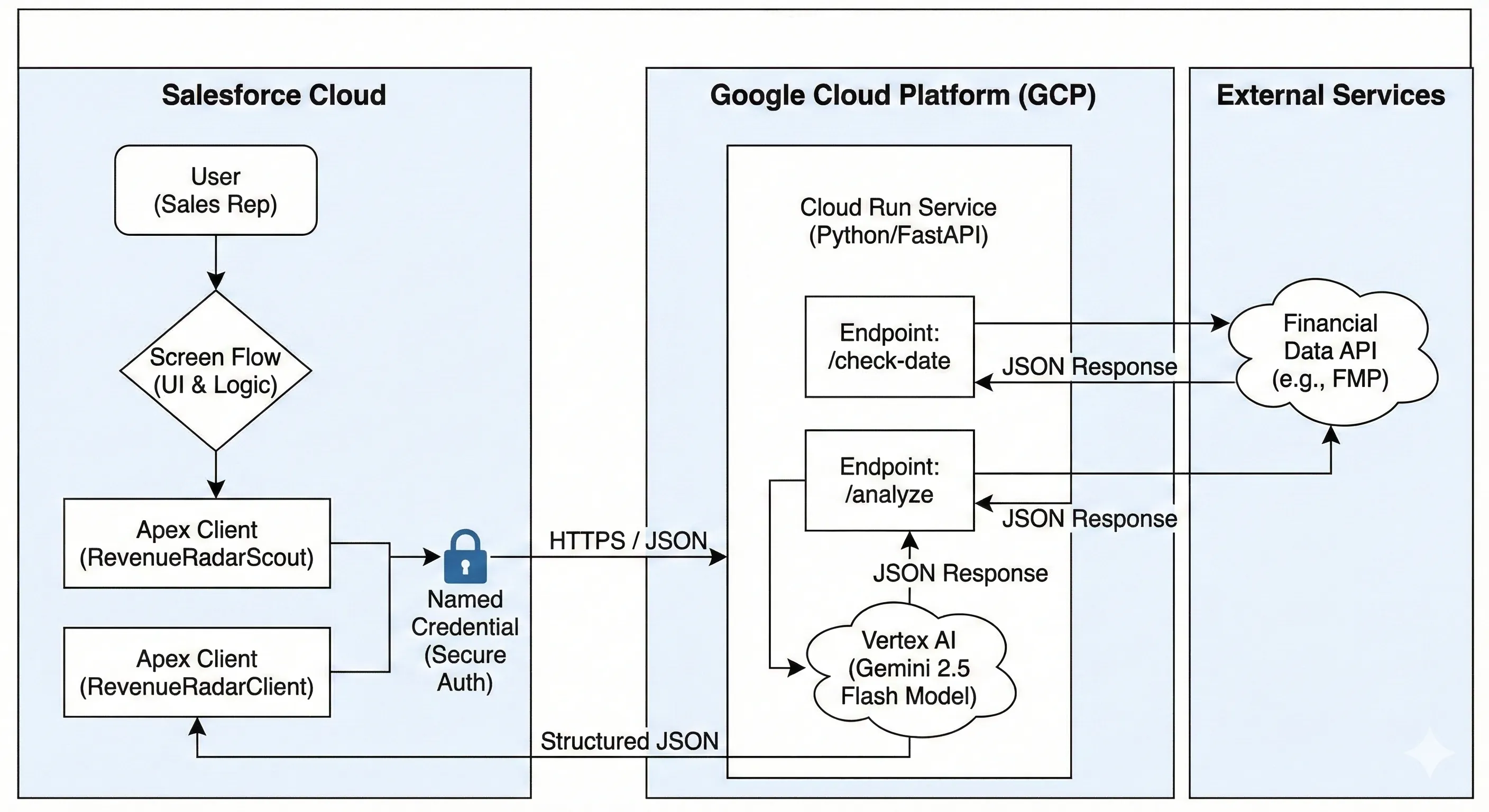
System of Engagement: Salesforce (Flow & Apex).
System of Intelligence: Google Cloud Run (Python/FastAPI).
The Brain: Google Gemini 2.5 Flash (Chosen for its massive 1M+ token context window and incredibly low cost).
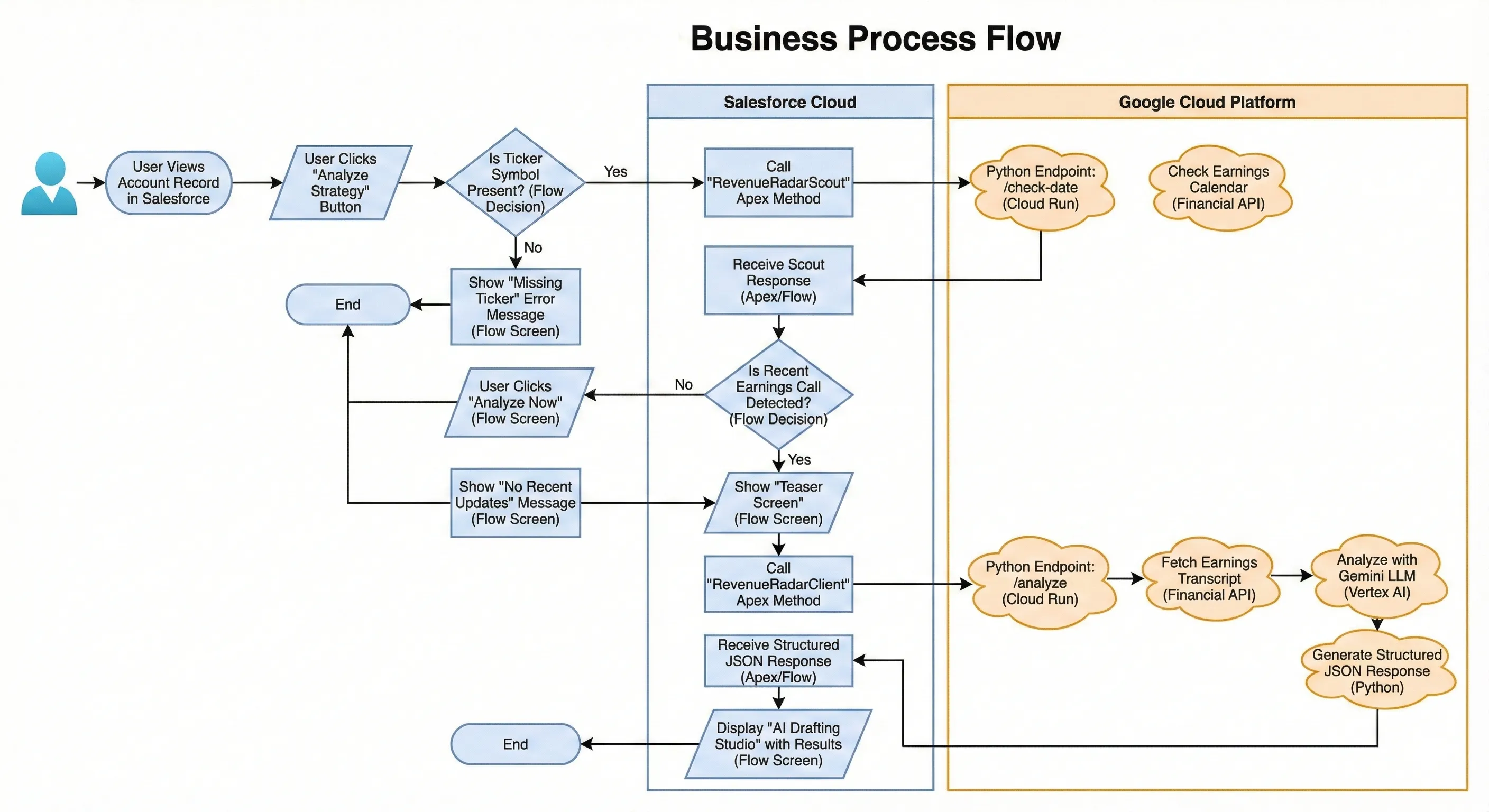
The Business Process Flow:
📐 The Architecture: The “Realist” View
The first question I always get: “Why didn’t you just use Flow? Why the Python middleware?”
Two words: Heap Size.
Salesforce is optimized for transactional data, not heavy text processing. If I tried to parse a 40-page PDF inside an Apex class or Flow, I’d be fighting the 6MB/12MB limits constantly.
I chose a Hybrid Architecture:
Salesforce handles the User, the Data, and the Security.
Google Cloud Run acts as the “Heavy Lifter.” It runs a containerized Python app that can hold the entire transcript in memory, run LangChain operations, and talk to Gemini.
This keeps the “Brain” scalable and the Salesforce Org clean.
🧠 Phase 1: The Python Brain
I started with the brain. I spun up a FastAPI service on Google Cloud Run using Gemini 2.5 Flash.
Why Flash? Because analyzing earnings calls is a volume game. I needed something fast and cheap that wouldn’t choke on a 1-hour conversation transcript.
But here is the pro-tip: Don’t let the LLM just spit out text. I used Pydantic V2 to enforce a strict contract.
Python
class StrategyResponse(BaseModel):
    ceo_quote: str = Field(description="Direct quote from the CEO")
    identified_initiative: str = Field(description="The strategic initiative")
    email_draft: str = Field(description="Draft email to the prospect")
Returning JSON instead of raw text was a critical architectural decision. It meant I could later save the ceo_quote to a custom field and put the email_draft into a separate task object.
⚠️ The Reality Check: The “Gotchas”
This is where the “Builder” reality set in. My original plan was “No Code.” It didn’t last long.
Hiccup #1: The “Invisible” Inputs
I generated an openapi.json from my Python API and ingested it into Salesforce External Services. On paper, this is perfect: Salesforce generates the Apex classes, and you use them in Flow.
The Failure: I spent an hour fighting the Flow Builder. I had defined a complex object in Python to handle the inputs. Salesforce generated a dynamic Apex class, but Flow refused to see the variables.
The Fix: The “Apex Wrapper” Pattern
I took off the “No Code” hat and put on the “Architect” hat. I wrote a simple Apex Class (RevenueRadarClient) with an @InvocableMethod.
It acts as a shock absorber. Flow talks to the Apex Class (using simple variables like Ticker string). The Apex Class handles the complex JSON serialization and talks to Google. Lesson: Sometimes, writing 50 lines of Apex saves you 5 hours of fighting the Flow Builder.
Hiccup #2: The “Token Diet”
Once the bugs were squashed, I looked at the performance and realized we were burning money. We made the classic “GenAI Rookie” mistake: we treated the API like a Chatbot.
The initial logic was a standard “Chain of Thought” RAG loop:
- Call 1: “Here is the transcript. Summarize the CEO’s focus.” (Wait 3s)
- Call 2: “Based on that summary, find a relevant quote.” (Wait 2s)
- Call 3: “Now draft an email using that quote.” (Wait 4s)
The Problem: - This approach is great for accuracy, but terrible for engineering. It meant 3x the latency and 3x the input token cost because we were re-sending the heavy context context for every step of the chain.
Optimization #1: The Single-Shot Sniper
I then refactored the Python logic to use a Single-Shot Strategy.
Instead of a conversation, send one dense instruction: “Read this once. Return a JSON object containing the ceo_quote, the identified_initiative, and the email_draft simultaneously.”
The Result:
- API Calls: 3 → 1
- Latency: ~9s → ~2.5s
Optimization #2: The Scout as Gatekeeper
The most expensive AI call is the one you don’t need to make.
During my initial testing, the “Analyze” button always triggered Gemini. If a user clicked it on an account with 2-year-old earnings data, I could have burned 50k tokens just to have the AI tell me “This data is old.”
I introduced the Scout Pattern mentioned below. By checking the date logic in Python before instantiating the LLM client, we created a zero-cost gatekeeper.
- Before: User clicks > Send 50k tokens > LLM says “Data old”. (Cost: $$)
- After: User clicks > Python checks Date > Python says “Data old”. (Cost: $0)
The Math: We reduced token consumption by 60-70% simply by stopping the AI from running on stale data.
🎨 The User Experience: Don’t Be Annoying
That solved the plumbing. Now I had to solve the Experience. Originally, the user clicked a button, waited 10 seconds, and got a result.
But what if the company hasn’t released earnings recently? I was wasting the user’s time (and API credits) analyzing old data.
I implemented the “Scout Pattern”. Added a lightweight endpoint /check-date in Python that runs in milliseconds.
Flow Starts.
Scout runs: “Hey Google, when was the last earnings call for ACME?”
Google replies: “5 days ago.”
Flow: Shows a teaser card: "🔔 New Data Detected! Analyze now?"
Only then I was able to successfully fire the heavy AI request. I also ditched the static “Display Text” component. I used a Long Text Area to create a “Drafting Studio.” The AI pre-fills the email, but the user can edit it immediately.
It turns the AI from a “Generator” into a “Copilot.”
✨ Closing Thought
Now I have an agent that is secure, robust, and user-centric.
It handles 50-page PDFs without hitting heap limits.
It creates structured data instead of text blobs.
It fails gracefully with clear error messages.
And here’s the final cut!
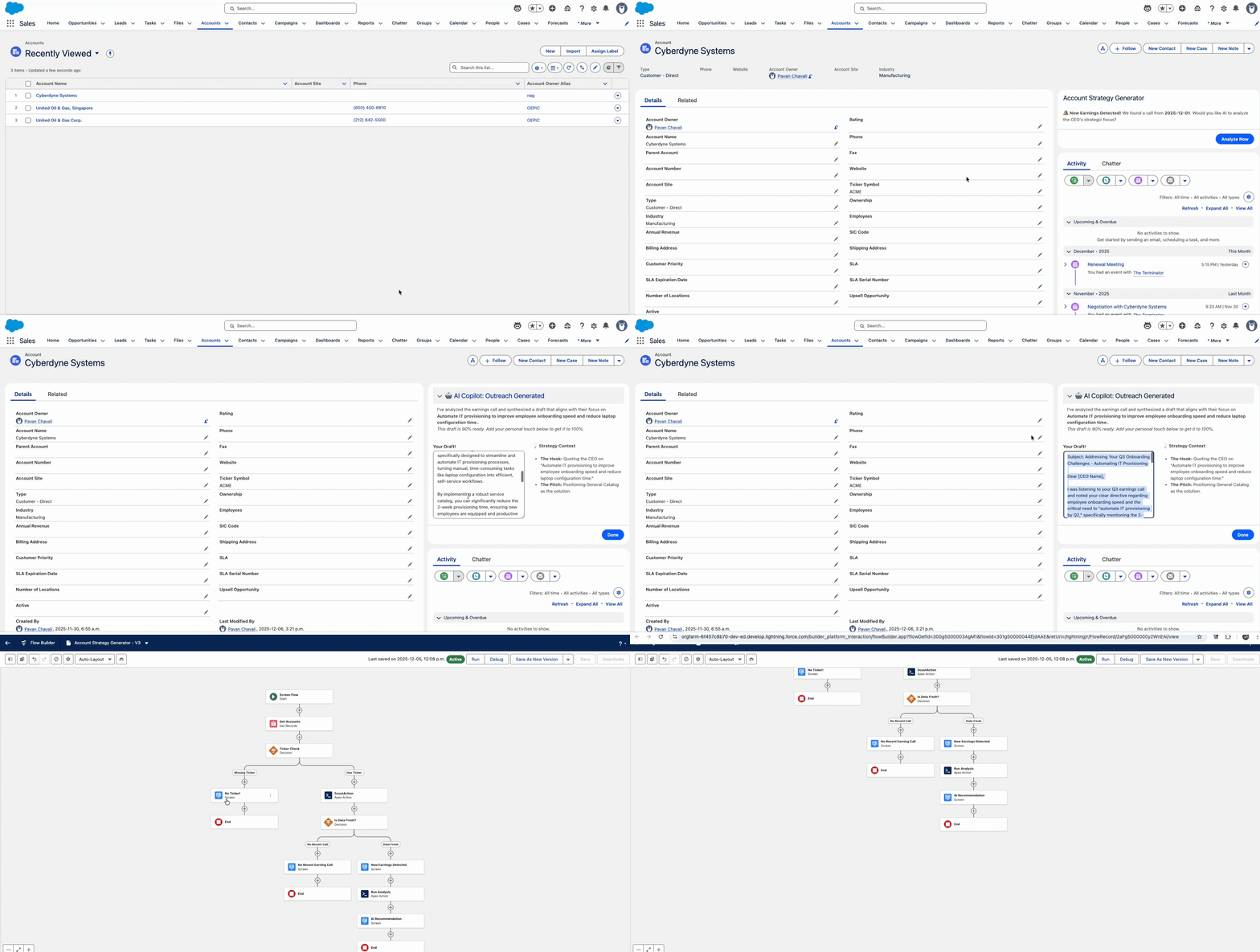
This journey reinforced my golden rule for Enterprise AI: Build the plumbing first. The AI part (Gemini) was actually the easiest part. The hard part was the auth, the serialization, and the error handling.
But now? It’s rock solid.
Call to Action: Stop building chatbots. Start building Strategy Engines.
💬 Let’s Argue
There is never just one way to solve a problem in Salesforce.
I chose Google Cloud Run + Gemini to bypass the Heap limits. You might have chosen AWS Lambda, Heroku, or maybe you are brave enough to try building this entirely inside Data Cloud with Vector Search.
👇 I want to hear your take:
How would you handle the 12MB Heap limit with a 40-page PDF?
Do you agree that “No Code” hits a wall with heavy AI workloads?
Drop a comment below. I learn as much from the debate as I do from the documentation.
🌱 Want more experiments? This is just one plant in my digital garden. I’m constantly breaking things, hitting limits, and documenting the fixes over at my personal site.
If you like deep dives into the “Real World” of Enterprise AI (minus the marketing fluff), go check it out: 👉 Pavan’s Digital Garden