
Salesforce consistently enhances Flows with each release, transforming them into a more robust and user-friendly feature. These improvements simplify usage and effectively address complex requirements that cannot be met through declarative means.
Did you know you can now implement cross-object validation rules without writing Apex code?
Until now, if you needed to check related records, like verifying their existence or displaying error messages to prevent record deletion in specific scenarios, or developers had to rely on Apex code.
In the Winter ’24 release, Salesforce introduced a valuable feature: Custom Error Messages as a Flow Element. This feature offers administrators and developers a practical solution to improve error handling and guide users effectively through Salesforce Flows. Let’s delve into the details of this feature, understand how to utilize it, consider important factors, and explore an illustrative example.
Use Case Scenario
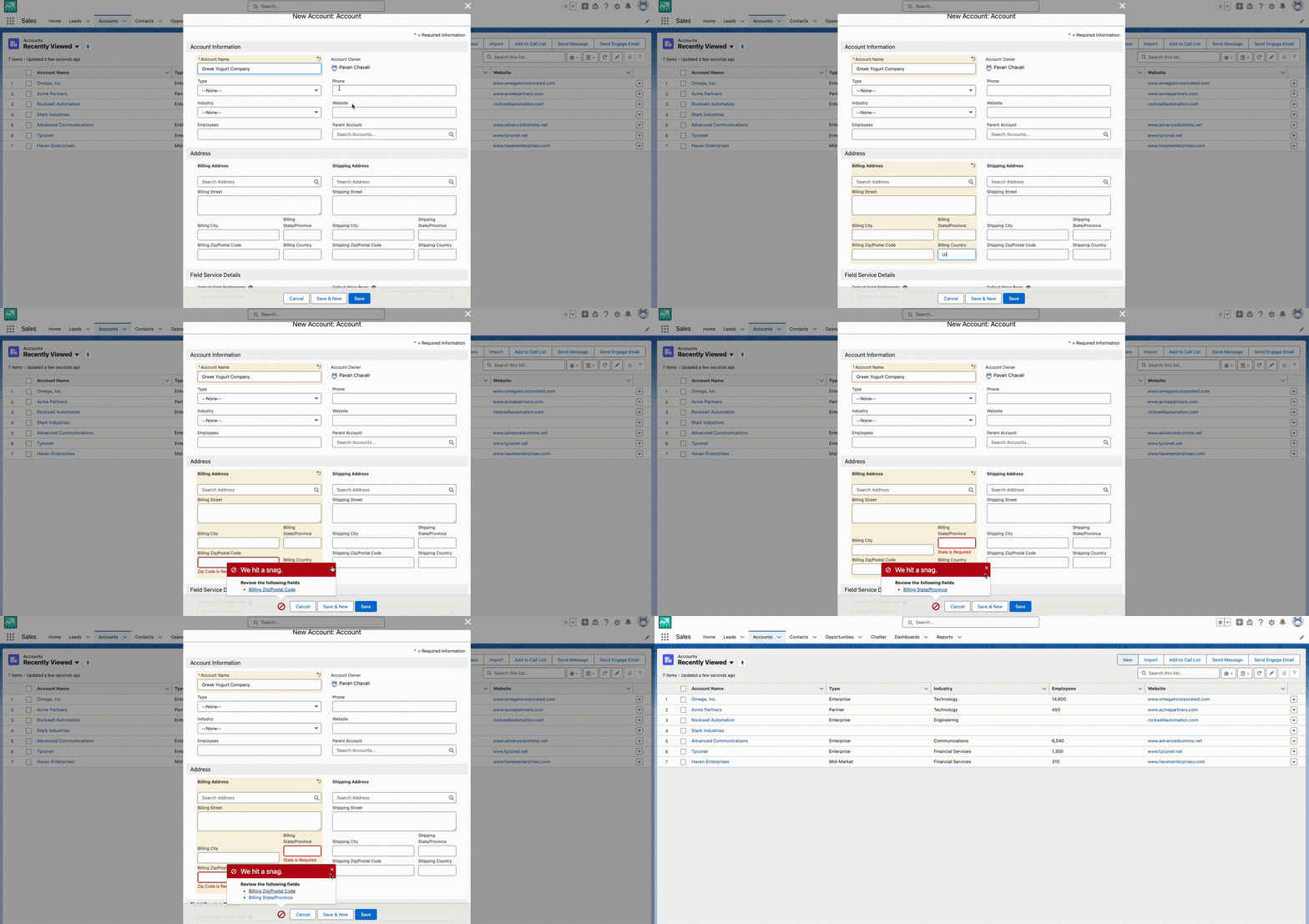
The requirement is to make certain address fields on the Account object conditionally required based on the billing country selected. Specifically, either the State/Province field or the Postal Code/Zip Code field should be required based on the selected billing country. Additionally, in some cases, both the State/Province and Postal Code/Zip Code fields may need to be required.
Traditionally, you’d handle this by creating a complex Validation Rule using nested AND, OR statements or CASE functions to check the selected country and set validation criteria for State/Province and Postal Code/Zip Code fields. Another option is using an Apex trigger. But using Validation Rules can be tricky because they’re hard to maintain, especially when you need to change or update certain criteria.
Let’s see how this can be solved using a record-trigger Flow.
Custom Metadata Type
Create a Custom Metadata Type tailored for storing essential details like Country name, State/Province requirement, and Zip Code requirement. Next, simplify data import by uploading a CSV file containing information for the 50+ countries directly into the Custom Metadata Type.
Below is a sample of the CSV file.
| Name | Country__c | Zip_Required__c | State_Required__c |
|---|---|---|---|
| CA | Canada | No | Yes |
| US | United States | Yes | No |
| IN | India | Yes | Yes |
Flow Design
Create a Record Trigger flow on Account object, that’s triggered when a record is created or updated that’s optimized for fast field updates and no conditions. Then add a Get Record element that references to the above created CMTD with country name equals to record’s BillingCountry.
Add a Decision element with condition outcomes to check and compare if Zip or State or both are required when a specific field on Account is null.
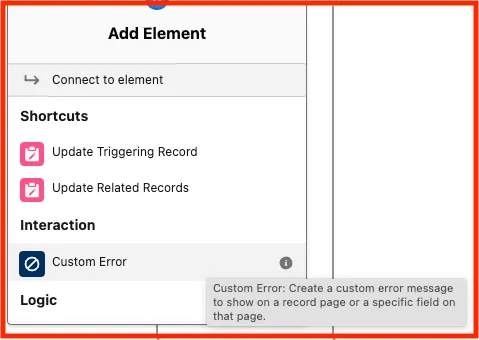
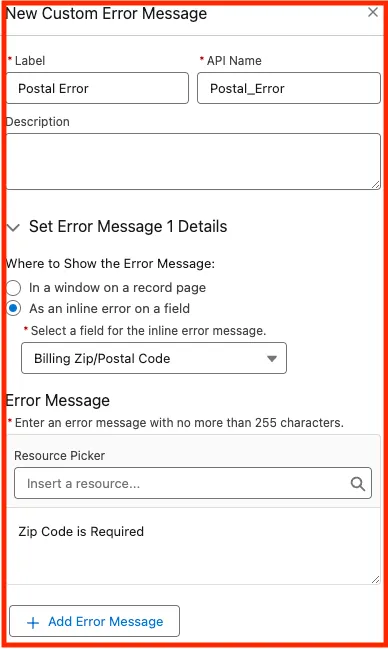
Now it’s time to add the Custom Error element! For each of the decision outcome, add Custom Error element. Here are a couple of screenshots of Custom Error element.
Either the error message can be displayed as an inline error or in a window. Note that you can add multiple error messages for one Custom Error element.
Save and Activate the flow.Flow with Custom Error Element

Voilà! You have now added a custom error without a single line of Apex code or a complex Validation Rule! Now let’s test this out.
Considerations
A Custom Error element can contain only one record page error message. To create another record page error message in the same flow, use another Custom error element.
A field can have only one error message, but each field can have an error message.
Compound fields aren’t supported.
If an executed fault path has a Custom Error element, the change that triggered the flow is rolled back.
Custom error messages use the same functionality as the addError() Id method in Apex.